Copy files from one document library to another document library within the same site collection.
script
Add-PSSnapin Microsoft.SharePoint.PowerShell -ErrorAction SilentlyContinue
#Copy Files from Source Folder to Target Folder
Function Copy-Files($SourceFolder, $TargetFolder)
{
write-host "Copying Files from:$($SourceFolder.URL) to $($TargetFolder.URL)"
#Get Each Source File
$SourceFilesColl = $SourceFolder.Files
#Iterate through each items
Foreach($SourceFile in $SourceFilesColl)
{
#Copy File from the Source
$NewFile = $TargetFolder.Files.Add($SourceFile.Name, $SourceFile.OpenBinary(),$True)
#Copy updated required fields
$ditem = $NewFile.Item
$ditem["Modified"] =$SourceFile.TimeLastModified.ToLocalTime()
$ditem["Created"] = $SourceFile.TimeCreated.ToLocalTime()
$ditem["Author"] = $SourceFile.Author
$ditem["Editor"] = $SourceFile.ModifiedBy
#Copy Meta-Data
Foreach($Field in $SourceFile.Item.Fields)
{
If(!$Field.ReadOnlyField)
{
if($NewFile.Item.Fields.ContainsField($Field.InternalName))
{
$NewFile.Item[$Field.InternalName] = $SourceFile.Item[$Field.InternalName]
}
}
}
#Update
$NewFile.Item.UpdateOverwriteVersion()
Write-host "Copied File:"$SourceFile.Name
}
#Process SubFolders
Foreach($SubFolder in $SourceFolder.SubFolders)
{
if($SubFolder.Name -ne "Forms")
{
#Check if Sub-Folder exists in the Target
$NewTargetFolder = $TargetFolder.ParentWeb.GetFolder($SubFolder.Name)
if ($NewTargetFolder.Exists -eq $false)
{
#Create a Folder
$NewTargetFolder = $TargetFolder.SubFolders.Add($SubFolder.Name)
}
#Call the function recursively
Copy-Files $SubFolder $NewTargetFolder
}
}
}
#Variables
$WebURL="https://portal.peelschools.org/My School/1553"
$SourceLibrary ="Shared Documents Area"
$TargetLibrary = "New"
#Get Objects
$Web = Get-SPWeb $WebURL
$SourceFolder = $Web.GetFolder($SourceLibrary)
$TargetFolder = $Web.GetFolder($TargetLibrary)
#Call the Function
Copy-Files $SourceFolder $TargetFolder
powershell-in-sharepoint.html#ixzz5S8r4cB00
Wednesday, 26 September 2018

Wednesday, 5 September 2018
Nintex Form - hiding panel and white spaces is being displayed
I have large amount of white space on my form because I am hiding multiple panels.
Steps to resolve issue
1. are the panel touching
2. create a separate rule for each panel
Steps to resolve issue
1. are the panel touching
2. create a separate rule for each panel
Thursday, 19 July 2018
Change the layout page of a publishing page
Issue
Update an exiting page to a new layout page and need to update all my sites page to the new layout page.
Code
Add-PSSnapin Microsoft.SharePoint.PowerShell -ErrorAction SilentlyContinue
#Site that I would like to implement the change on
$StartWeb="https://intranet.peelschools.org/ltss/pmo/PMLC"
#filter to only the sites that I want
$subsites = ((Get-SPWeb $StartWeb).Site).allwebs | ?{$_.url -like "$StartWeb*"}
$pWeb = [Microsoft.SharePoint.Publishing.PublishingWeb]::GetPublishingWeb($subsites)
$pSite = New-Object Microsoft.SharePoint.Publishing.PublishingSite($subsites.Site)
#need the root of the site collection to get the layout page from
$rootSite = Get-SPSite https://intranet.peelschools.org
$site =$subsites
$lookForList = "Pages"
foreach($subsite in $subsites){
$spPubWeb = [Microsoft.SharePoint.Publishing.PublishingWeb]::GetPublishingWeb($subsite)
$pages = $spPubWeb.PagesList
$myLayout = $siteLayouts["/_catalogs/masterpage/PDSB/Content.aspx"]
#Add site content types to the list
$ctToAdd = $rootSite.RootWeb.ContentTypes["Intranet SP2013"]
$ct = $pages.ContentTypes.Add($ctToAdd)
write-host "Content type" $ct.Name "added to list" $pages.Title
foreach($item in $pages.Items)
{
$pubPage = [Microsoft.SharePoint.Publishing.PublishingPage]::GetPublishingPage($item)
if ($pubPage.Title -ne "Forms" -and $pubPage.Title -ne "All Documents" -and $pubPage.Title -ne "Documents")
{
$pubPage.CheckOut()
$pubPage.Layout = $myLayout
# $pubPage.item["Show Resources in page"]=$true
$pubPage.
$pubPage.Update()
$pubPage.CheckIn("")
$pageFile = $pubPage.ListItem.File
$pageFile.Publish("")
}
}
Write-Host $subsite.url "is done"
}
$subsites.Dispose()
$rootsite.Dispose()
$site.Dispose()
Update an exiting page to a new layout page and need to update all my sites page to the new layout page.
Code
Add-PSSnapin Microsoft.SharePoint.PowerShell -ErrorAction SilentlyContinue
#Site that I would like to implement the change on
$StartWeb="https://intranet.peelschools.org/ltss/pmo/PMLC"
#filter to only the sites that I want
$subsites = ((Get-SPWeb $StartWeb).Site).allwebs | ?{$_.url -like "$StartWeb*"}
$pWeb = [Microsoft.SharePoint.Publishing.PublishingWeb]::GetPublishingWeb($subsites)
$pSite = New-Object Microsoft.SharePoint.Publishing.PublishingSite($subsites.Site)
#need the root of the site collection to get the layout page from
$rootSite = Get-SPSite https://intranet.peelschools.org
$site =$subsites
$lookForList = "Pages"
foreach($subsite in $subsites){
$spPubWeb = [Microsoft.SharePoint.Publishing.PublishingWeb]::GetPublishingWeb($subsite)
$pages = $spPubWeb.PagesList
$myLayout = $siteLayouts["/_catalogs/masterpage/PDSB/Content.aspx"]
#Add site content types to the list
$ctToAdd = $rootSite.RootWeb.ContentTypes["Intranet SP2013"]
$ct = $pages.ContentTypes.Add($ctToAdd)
write-host "Content type" $ct.Name "added to list" $pages.Title
foreach($item in $pages.Items)
{
$pubPage = [Microsoft.SharePoint.Publishing.PublishingPage]::GetPublishingPage($item)
if ($pubPage.Title -ne "Forms" -and $pubPage.Title -ne "All Documents" -and $pubPage.Title -ne "Documents")
{
$pubPage.CheckOut()
$pubPage.Layout = $myLayout
# $pubPage.item["Show Resources in page"]=$true
$pubPage.
$pubPage.Update()
$pubPage.CheckIn("")
$pageFile = $pubPage.ListItem.File
$pageFile.Publish("")
}
}
Write-Host $subsite.url "is done"
}
$subsites.Dispose()
$rootsite.Dispose()
Display attachments as an image
Request
Display the attachments as image using jquery script. The attachments are images that have been uploaded. The attachments are still links but the image is displayed on the form in read mode.
Example

Code
<script type="text/javascript" src="https://code.jquery.com/jquery-1.11.3.min.js">
</script>
<script type="text/javascript">
$(document).ready(function(){
$('#idAttachmentsTable tr td span a').each(function() {
$(this).text('');
var a_href = $(this).attr('href');
$(this).append("<img alt='' src='" + a_href + "' width=80% />");
});
});
</script>

Display the attachments as image using jquery script. The attachments are images that have been uploaded. The attachments are still links but the image is displayed on the form in read mode.
Example

Code
<script type="text/javascript" src="https://code.jquery.com/jquery-1.11.3.min.js">
</script>
<script type="text/javascript">
$(document).ready(function(){
$('#idAttachmentsTable tr td span a').each(function() {
$(this).text('');
var a_href = $(this).attr('href');
$(this).append("<img alt='' src='" + a_href + "' width=80% />");
});
});
</script>
Results

Wednesday, 14 December 2016
error export Nintex workflow
Issue
When trying to export the Nintex workflow we got the following errors.Error #1
Server Error in '/' Application.
Validation of viewstate MAC failed. If this application is hosted by a Web Farm or cluster, ensure that <machineKey> configuration specifies the same validationKey and validation algorithm. AutoGenerate cannot be used in a cluster.
http://go.microsoft.com/fwlink/?LinkID=314055
Description: An unhandled exception occurred during the execution of the current web request. Please review the stack trace for more information about the error and where it originated in the code. Exception Details: System.Web.HttpException: Validation of viewstate MAC failed. If this application is hosted by a Web Farm or cluster, ensure that <machineKey> configuration specifies the same validationKey and validation algorithm. AutoGenerate cannot be used in a cluster.
http://go.microsoft.com/fwlink/?LinkID=314055
Error #2
Server Error in '/' Application.
Cannot find workflow in repository.
Description: An unhandled exception occurred during the execution of the current web request. Please review the stack trace for more information about the error and where it originated in the code.Exception Details: Nintex.Workflow.NWException: Cannot find workflow in repository.
Source Error:
An unhandled exception was generated during the execution of the
current web request. Information regarding the origin and location of the
exception can be identified using the exception stack trace below.
|
Stack Trace:
|
This is happening because you are accessing the workflow from site setting-> Workflows gallery (Nintex Workflow section) in top the level site (root of the site collection).

You need to access the workflow from site Nintex menu.
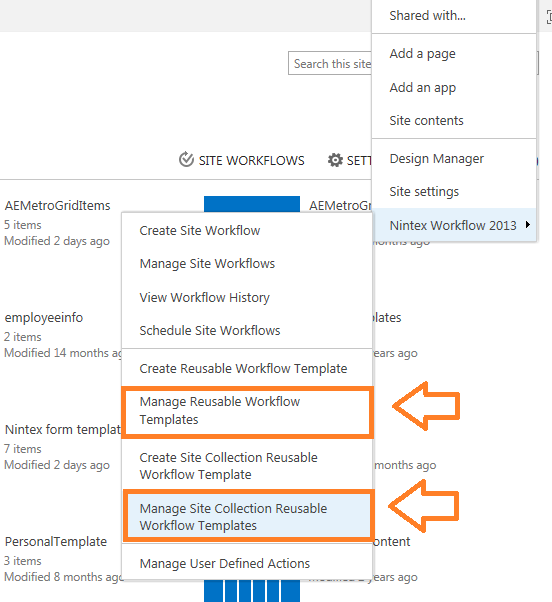
.
Wednesday, 12 October 2016
Powershell: starting a workflow on items in list within a view
I had so much trouble getting this to work I thought I would share this.
Limitation of this you can only process the items within the page of the view so you need to change your max page number to 1000.
#web site url
$siteurl="https://portal.peelschools.org/MLP"
#list name
$ListName="AODAACCE"
#workflow Name
$workflowName="DBUpdateReusable2010WF"
#view name Note: Change the view limit to 1000. This script is limited the page in a view.
$viewName="wf"
#content type name
$ctname="MLPRequiredAction"
$cTypes = $list.ContentTypes
$cType = $cTypes[$ctname]
$web = Get-SPWeb -Identity $siteurl
$manager = $web.Site.WorkFlowManager
$List = $Web.lists[$ListName]
$view = $list.Views[$viewName]
# Name of the Workflow
$assoc = $cType.WorkflowAssociations.GetAssociationByName($workflowName,"en-US")
$web.AllowUnsafeUpdates = $true
$wf = $cType.WorkflowAssociations
$data = $wf.AssociationData
write-host $view.Url
foreach($item in $list.GetItems($view))
{
$mywf = $manager.StartWorkFlow($item,$assoc,$data,$true)
}
$manager.Dispose()
$Web.Dispose()
Error message
Exception calling "StartWorkflow" with "4" argument(s): "This workflow association is not valid for use with this item."
At line:33 char:2
+ $mywf = $manager.StartWorkFlow($item,$assoc,$data,$true)
+ ~~~~~~~~~~~~~~~~~~~~~~~~~~~~~~~~~~~~~~~~~~~~~~~~~~~~~~~~
+ CategoryInfo : NotSpecified: (:) [], MethodInvocationException
+ FullyQualifiedErrorId : ArgumentException
I had to add the following line to resolve the error.
$web.AllowUnsafeUpdates = $true
Limitation of this you can only process the items within the page of the view so you need to change your max page number to 1000.
#web site url
$siteurl="https://portal.peelschools.org/MLP"
#list name
$ListName="AODAACCE"
#workflow Name
$workflowName="DBUpdateReusable2010WF"
#view name Note: Change the view limit to 1000. This script is limited the page in a view.
$viewName="wf"
#content type name
$ctname="MLPRequiredAction"
$cTypes = $list.ContentTypes
$cType = $cTypes[$ctname]
$web = Get-SPWeb -Identity $siteurl
$manager = $web.Site.WorkFlowManager
$List = $Web.lists[$ListName]
$view = $list.Views[$viewName]
# Name of the Workflow
$assoc = $cType.WorkflowAssociations.GetAssociationByName($workflowName,"en-US")
$web.AllowUnsafeUpdates = $true
$wf = $cType.WorkflowAssociations
$data = $wf.AssociationData
write-host $view.Url
foreach($item in $list.GetItems($view))
{
$mywf = $manager.StartWorkFlow($item,$assoc,$data,$true)
}
$manager.Dispose()
$Web.Dispose()
Error message
Exception calling "StartWorkflow" with "4" argument(s): "This workflow association is not valid for use with this item."
At line:33 char:2
+ $mywf = $manager.StartWorkFlow($item,$assoc,$data,$true)
+ ~~~~~~~~~~~~~~~~~~~~~~~~~~~~~~~~~~~~~~~~~~~~~~~~~~~~~~~~
+ CategoryInfo : NotSpecified: (:) [], MethodInvocationException
+ FullyQualifiedErrorId : ArgumentException
I had to add the following line to resolve the error.
$web.AllowUnsafeUpdates = $true
Tuesday, 4 October 2016
Redirection page- Out of box publishing redirection page
There is a delay of 5 sec.

There is a delay of 5 sec.
- open sharepoint designer
- detach from layouts design
- edit in advance mode
- change the following
- <PublishingWebControls:RedirectControl SecondsBeforeRedirect="5" runat="server"/>
to
<PublishingWebControls:RedirectControl SecondsBeforeRedirect="0" runat="server"/> - publish the page

Subscribe to:
Posts (Atom)